Aspect Ratios in Photography: How to Choose the Right Format
Learn how aspect ratios affect your photos. Compare 3:2, 4:3, 1:1, 4:5, and 16:9 formats across camera types, print sizes, and shooting styles to pick the right one.
What This Guide Covers
Why Aspect Ratio Matters in Photography
The aspect ratio of a photograph determines its shape. It affects composition, how the image fits a print or screen, and how much of the scene the camera captures. Every camera sensor has a native aspect ratio, and understanding it helps you make better decisions before and after pressing the shutter.
Choosing the wrong ratio leads to awkward crops, wasted resolution, and prints that do not match standard frame sizes. This guide covers the most common photography aspect ratios, the cameras that use them, and how to pick the right format for your work.
Common Photography Aspect Ratios
Each ratio has a distinct look and fits specific camera systems and print sizes
3:2 -- The 35mm Standard
4x6", 6x9", 8x12", 12x18", 20x30"
The 3:2 ratio comes from 35mm film (36x24mm). It remains the most common format in photography. Most Canon, Nikon, Sony, and Fujifilm cameras shoot natively in 3:2. The slightly rectangular shape works well for both landscape and portrait orientations, giving enough room for subjects without feeling too wide or too narrow.
4:3 -- Micro Four Thirds and Compacts
4x5.3", 6x8", 8x10.7", 9x12"
The 4:3 ratio is native to Micro Four Thirds sensors and most compact cameras. It is slightly more square than 3:2, which can feel more balanced for certain compositions. Many photographers who shoot portraits prefer 4:3 because it leaves less empty space around the subject. Smartphones also default to 4:3 for photos.
1:1 -- Square Format
5x5", 8x8", 10x10", 12x12"
The square format has a long history in medium format film photography. Hasselblad 6x6cm cameras produced iconic square images for decades. Today, no major digital camera shoots natively in 1:1, but many photographers crop to square for its symmetrical, focused composition. It works well for subjects centered in the frame.
4:5 -- Large Format Portrait
4x5", 8x10", 16x20", 24x30"
The 4:5 ratio matches the classic 8x10" large format film. It is taller than 4:3, giving a natural portrait orientation that works well for headshots, fashion, and environmental portraits. Instagram uses 4:5 for portrait feed posts, making it a practical choice for photographers who share work online.
16:9 -- Panoramic Digital
8x14.2", 12x21.3" (non-standard print sizes)
The 16:9 ratio is the standard for video and widescreen displays, but it is rarely native to photo cameras. Some cameras offer a 16:9 crop mode, though this simply masks the sensor. It works well for cinematic landscapes and establishing shots, but requires custom print sizes since it does not match standard photo paper.
5:4 -- Large Format Classic
5x4", 10x8", 20x16", 30x24"
The 5:4 ratio is nearly square and comes from large format sheet film. It produces a compact, balanced frame that suits architectural and studio photography. The slight height advantage over 1:1 gives just enough room for vertical subjects without the elongation of 4:5 or 3:2.
Camera Sensor Aspect Ratios
Native ratios vary by sensor type and affect your composition from the moment you frame a shot
| Sensor Type | Native Ratio | Common Cameras | Best For |
|---|---|---|---|
| Full-frame (36x24mm) | 3:2 | Canon R5, Nikon Z8, Sony A7 IV | All-around photography, landscapes, portraits |
| APS-C (23.5x15.6mm) | 3:2 | Fujifilm X-T5, Canon R7, Nikon Z50 | Travel, street, wildlife |
| Micro Four Thirds (17.3x13mm) | 4:3 | OM System OM-5, Panasonic GH7 | Video, travel, macro |
| Medium Format (44x33mm) | 4:3 | Fujifilm GFX 100 II, Hasselblad X2D | Studio, landscape, fashion |
| Smartphone | 4:3 | iPhone, Samsung Galaxy, Google Pixel | Everyday, social media, documentation |
Aspect Ratio and Print Sizes
Matching your ratio to standard print sizes avoids cropping at the print lab
| Aspect Ratio | Print Size | Pixels at 300 DPI | Megapixels Needed |
|---|---|---|---|
| 3:2 | 4 x 6" | 1200 x 1800 | 2.2 MP |
| 8 x 12" | 2400 x 3600 | 8.6 MP | |
| 20 x 30" | 6000 x 9000 | 54 MP | |
| 4:3 | 6 x 8" | 1800 x 2400 | 4.3 MP |
| 9 x 12" | 2700 x 3600 | 9.7 MP | |
| 4:5 | 8 x 10" | 2400 x 3000 | 7.2 MP |
| 16 x 20" | 4800 x 6000 | 28.8 MP | |
| 1:1 | 8 x 8" | 2400 x 2400 | 5.8 MP |
| 12 x 12" | 3600 x 3600 | 13 MP | |
| 5:4 | 10 x 8" | 3000 x 2400 | 7.2 MP |
| 20 x 16" | 6000 x 4800 | 28.8 MP |
Cropping vs Shooting in Native Ratio
Three approaches to getting the aspect ratio you want
Shoot in Native Ratio
Use your camera sensor full frame at its native ratio. This maximizes resolution and gives you the most data to work with. Compose with the native ratio in mind, and choose print sizes that match. For a 3:2 sensor, that means 4x6", 8x12", or 20x30" prints.
Crop in Post-Processing
Shoot at the native ratio and crop later in Lightroom, Capture One, or similar software. This gives flexibility but reduces resolution. A 24MP image cropped from 3:2 to 4:5 loses roughly 10% of its pixels. Crop from 3:2 to 16:9 and you lose about 25%. Always start with the highest resolution your camera offers.
Pre-Visualize the Crop
Some cameras let you overlay crop guides in the viewfinder (4:5, 1:1, 16:9). This shows you the final frame while still recording the full sensor area. It is the best of both worlds: you compose for the target ratio but keep all the pixels. Check your camera menu for "crop guide" or "aspect ratio guide" settings.
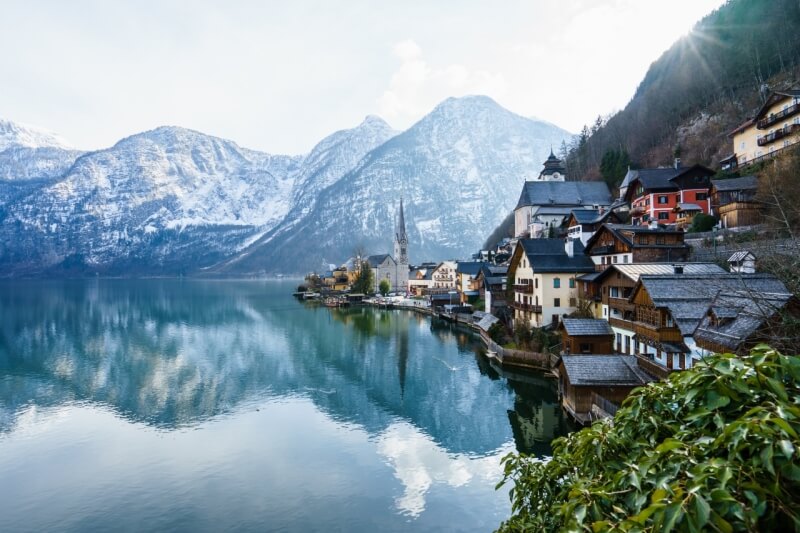
One photo, five aspect ratios
The same landscape cropped to different formats. Notice how each ratio changes the composition, emphasizing different parts of the scene.
3:2
4:3
1:1
4:5
16:9
Digital Sensors vs Film Formats
How modern sensors compare to classic film dimensions
Digital cameras inherited their aspect ratios from film. The full-frame sensor matches 35mm film at 3:2. Micro Four Thirds sensors approximate the proportions of older 4:3 video standards. Medium format digital sensors typically use 4:3, which differs from the 6x7cm (7:6) and 6x6cm (1:1) film backs that were popular in the analog era.
The key difference is flexibility. Film shooters committed to a ratio when loading a film back. Digital shooters can change their crop in software without losing the original file. However, this convenience sometimes leads to sloppy framing, where the photographer assumes they can "fix it in post" rather than composing carefully in-camera.
For the sharpest results and least wasted resolution, choose your target aspect ratio before the shoot. If you know the final output will be 4:5 for Instagram or 3:2 for a gallery print, compose accordingly. This approach reduces post-processing time and delivers cleaner images.
| Format | Dimensions | Aspect Ratio | Era |
|---|---|---|---|
| 35mm film | 36 x 24 mm | 3:2 | Film / Digital |
| Full-frame sensor | 36 x 24 mm | 3:2 | Digital |
| APS-C sensor | 23.5 x 15.6 mm | 3:2 | Digital |
| Micro Four Thirds | 17.3 x 13 mm | 4:3 | Digital |
| Medium format film (645) | 56 x 41.5 mm | 4:3 | Film |
| Medium format film (6x6) | 56 x 56 mm | 1:1 | Film |
| Medium format film (6x7) | 56 x 70 mm | 5:4 | Film |
| Large format (4x5") | 127 x 102 mm | 5:4 | Film |
| Medium format digital | 44 x 33 mm | 4:3 | Digital |
Frequently Asked Questions
3:2 is the most common aspect ratio in photography. It comes from 35mm film and is the native ratio for full-frame and APS-C digital cameras from Canon, Nikon, Sony, Fujifilm, and others. Most standard photo prints (4x6", 8x12") are also 3:2.
It depends on the camera. Some cameras physically mask the sensor, recording fewer pixels. Others record the full sensor area but add crop marks to the JPEG preview, preserving full resolution in the RAW file. Check your camera manual to see which method yours uses.
Use the ratio that matches your target print size. For 4x6" or 8x12" prints, shoot or crop to 3:2. For 8x10" or 16x20" prints, use 4:5. For 5x7" prints, use 5:7. Mismatched ratios mean the print lab will crop your image, potentially cutting off important parts of the composition.
Smartphone sensors are designed around the 4:3 ratio, which is slightly more square than 3:2. This gives a better fit for vertical (portrait) shooting, which is how most people hold their phones. The 4:3 ratio also works well for social media platforms where square and near-square images are common.
Yes, by cropping. Any image can be cropped to any aspect ratio in post-processing software. The trade-off is lost pixels: cropping removes parts of the image and reduces the final resolution. For the best quality, compose for your target ratio at the time of shooting.
3:2 works well for most landscapes because it is wide enough to capture a panoramic feel without being extreme. For wider scenes, consider 16:9 or panoramic stitching. For a more balanced, gallery-friendly look, 4:5 or 5:4 can add a sense of presence that very wide ratios lack.
Calculate Your Photo Dimensions
Use our aspect ratio calculators to find the exact pixel dimensions for any print size or screen resolution